In a nutshell: the FPShop Details Report Telangana is a public form on the official portal. You pick a district, an office and a shop status, then press Submit. Your own card search also carries an FPShop No, and that number is the link to your shop.
- Where to Find the FPShop Details Report in Telangana
- FPShop Details Report Form: Fields Explained One by One
- How to Use the Fair Price Shop Details Report
- Why Your Ration Card's FPShop No Matters
- Ration Shop Checklist Before You Visit the Fair Price Shop
- What to Ask the Ration Shop Dealer
- What to Do If the Fair Price Shop Refuses Your Card
- What the Telangana FPShop Details Report Does Not Tell You
Think of a daughter-in-law who has just moved to her husband's village. She has the ration card, but nobody told her which shop to go to, or who the dealer is. The official portal has a form meant for this kind of question. This site is independent and not a government website. We explain the form as it appeared on 25 October 2026.
Where to Find the FPShop Details Report in Telangana
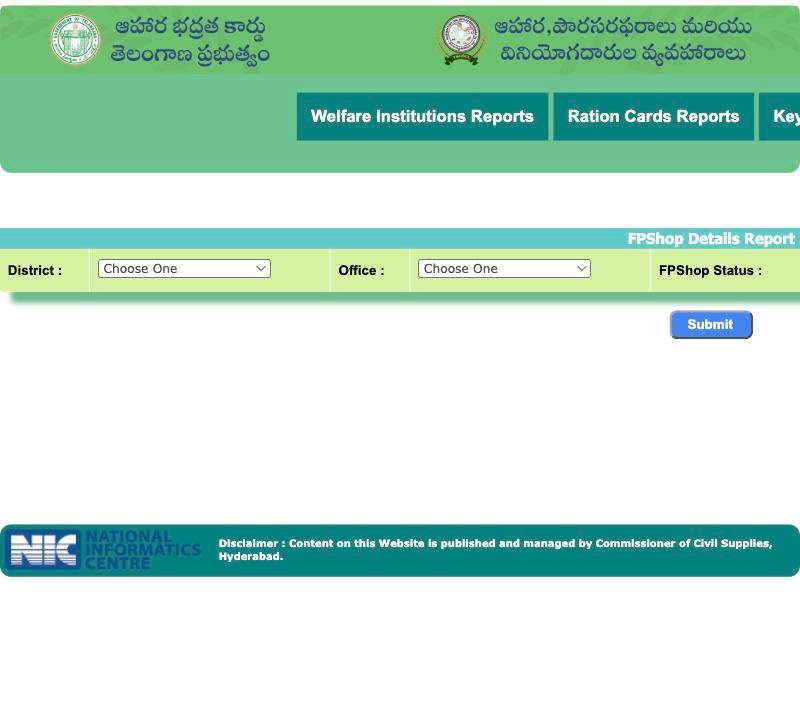
On the official EPDS Telangana home page, hover over Reports. Under Ration Cards Reports you will see FPShop Details Report. FPShop means fair price shop, the ration shop. It needs no login.
 1234
1234- 1 Choose district
- 2 Choose office
- 3 FPShop Status filter
- 4 Press Submit
FPShop Details Report Form: Fields Explained One by One
| Field | What you do |
|---|---|
| District | Pick from the dropdown of 33 districts. Each name carries a code, like "Adilabad--532". |
| Office | This list fills only after you choose a district. Pick the office for your area. |
| FPShop Status | A filter. Choose the option you need from its list. |
| Submit | Press it to generate the report. |
The code after the district name is only a label. You do not type it. Select the district name from the list, then wait a moment for the Office list to fill.
What the result page contains, we did not explore. So we will not describe it. Open it yourself and read what is there. Do not type any personal detail on this form. It does not ask for any.
How to Use the Fair Price Shop Details Report
- Pick your district. If you are not sure, use the district where your card was issued, then try your current one.
- Wait for the Office list, and pick the office that covers your mandal or ward.
- Choose a status in FPShop Status, then press Submit.
- Read the result and note the shop name or number you recognise.
- If nothing looks right, do not worry. Ask the Civil Supplies office which shop your card is attached to.
Why Your Ration Card's FPShop No Matters
Every card is attached to a shop. The portal shows that link as a field called FPShop No. If the number on your card result matches a shop in the report, you know where your quota is meant to be collected. If you are not sure, a mismatch is a good question to take to the office.
A farmer's family might move from one mandal to another for work. The card may still show the old shop. The report helps you spot this. Whether and how the shop can be changed is something to ask the office. We have not verified a rule for it.
Where to See the FPShop No on Your Ration Card Result
We saw this field on three result pages of the official portal.
| Official page | Shows FPShop No? | You need to type |
|---|---|---|
| FSC Ration Card Search result | Yes | A card number, in one of the allowed forms |
| FSC Application Search result | Yes | MeeSeva No or Application No |
| Rejected search result | Yes | RationCard No |
So even a rejected application's result shows the shop number. That can help when a family has lost the paper but remembers the card number.
 123456
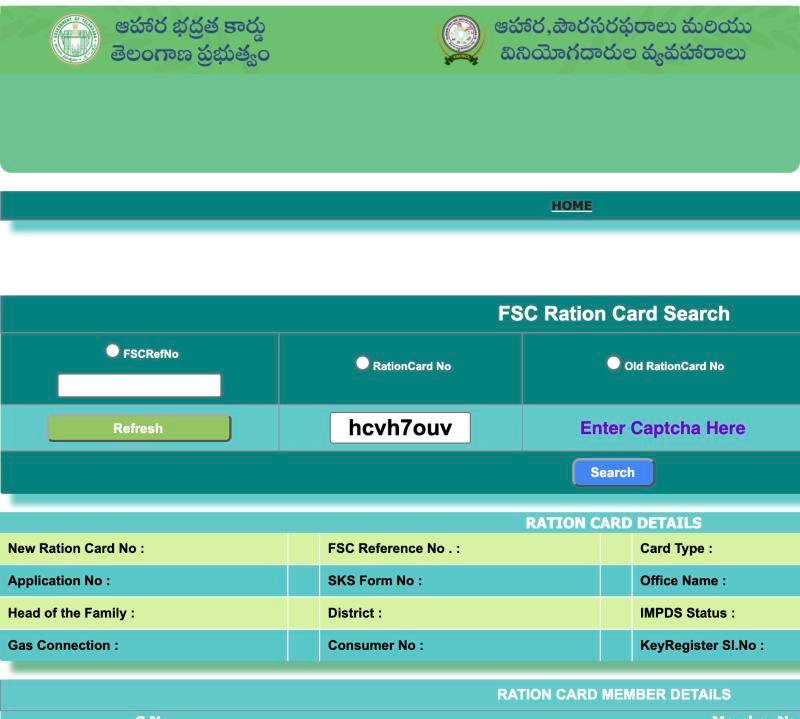
- 1 Choose FSCRefNo and type it
- 2 or RationCard No
- 3 or Old RationCard No
- 4 Type the captcha shown
- 5 Press Search
- 6 Card details appear here
To search your card, start from the FSC Search home page. If you plan to search with an Aadhaar number, first read what actually works with Aadhaar.
Ration Shop Checklist Before You Visit the Fair Price Shop
- Search your card once and write the FPShop No on a slip.
- Look the same number up in the FPShop Details Report, if you can find it.
- Carry the physical card, or a clear photo of it.
- Take the family member whose fingerprint was used before. The shop uses a fingerprint machine called ePoS.
- Keep your phone charged in case the office or helpline needs to be called.
- Go early in the day, and keep a small notebook for what the dealer says.
What to Ask the Ration Shop Dealer
A polite, direct question works better than an argument. You can ask:
- "Is my card attached to this shop? My FPShop No on the portal is this."
- "My name or a member is not showing on your machine. What do you see on screen?"
- "If the machine rejects the fingerprint, what is the next step you follow?"
- "Who should I call if the issue is not solved here?"
Never hand over an OTP to the dealer or to anyone on the phone. If it is a fingerprint problem, read our eKYC and fingerprint failure note.
What to Do If the Fair Price Shop Refuses Your Card
Do not argue loudly. First compare the FPShop No on your card result with the shop's own number. If they match and you are still turned away, note the date, the shop and what was said. Then ask the helpline on 1967. If you are at another shop under the portability idea, the guide on when a shop refuses under One Nation One Ration Card gives a calm way ahead. The official grievance portal also has a toll-free line on 1967.
What the Telangana FPShop Details Report Does Not Tell You
We did not check whether the report shows dealer phone numbers, stock or timings. So please do not assume it does. Use it to find the shop and then ask people. For allocations, there is a separate Allocation Reports item in the menu, but we have not opened its results either.
Frequently Asked Questions
Where is the FPShop Details Report on the Telangana ration portal?
On the official EPDS home page, hover over Reports, then Ration Cards Reports, and click FPShop Details Report. You choose a district and office, then press Submit. No login is needed.
What does FPShop mean?
FPShop is a fair price shop, the ration shop where card holders collect their quota. The portal shows the shop linked to your card as the field FPShop No.
How do I find my ration shop number?
Search your card on the official FSC Ration Card Search and read the FPShop No in the result. The FSC Application Search result also shows it, if you have an application number.
Why does the Office dropdown stay empty?
It fills only after you choose a district. Select the district name first, wait a moment, and then pick the office. If it still does not fill, reload the page and try again.
Can I change my ration shop in Telangana?
We have not verified any rule or form for changing a shop. Ask the Civil Supplies office or the 1967 helpline whether it can be done for your card and what paper they need.
What should I do if the dealer says my card is not at his shop?
Check the FPShop No on your card result against the shop's number. If they match, note the details and call the helpline. If they differ, ask the office which shop is correct.
Similar guides
One Nation One Ration Card Telangana
Shop refused your ration away from home under One Nation One Ration Card in Telangana? Record the refusal, check your card and report it with this script.
Telangana Ration Card eKYC and Biometric Fix
Telangana ration card eKYC biometric failure: why a fingerprint fails at the shop, a list of questions to ask the dealer and safe next steps.