Many families lose the ration card number but still remember an Aadhaar number. So they search for FSC search with Aadhaar no to look up the card with it. This page gives the plain answer, shows the official forms that exist, and lists practical ways to recover the number the portal actually accepts.
| The plain answer |
|---|
| On 25 Oct 2026 none of the three official forms had an Aadhaar number box. FSC Ration Card Search takes a card number, FSC Application Search takes a MeeSeva or application number, and Status of Rejected Ration Card Search takes a card number. An Aadhaar column appears only inside a result table. To look up a record, first find one of those numbers. Process advice here is general; confirm with MeeSeva or the Civil Supplies office. |
- Can You Do FSC Search With Aadhaar No? The Honest Answer
- What the Three FSC Search Forms Accept Instead of Aadhaar Number
- What the FSC Application Form Looks Like Without an Aadhaar Box
- How to Find Your Ration Card Number Instead of Using Aadhaar
- Worked Example: Checking Parents' Application Without Aadhaar Search
- Myths and Facts About FSC Search With Aadhaar Number
- Where Aadhaar Does Show Up on the Ration Card Portal
- Which Number to Hunt For: Ration Card Number or MeeSeva Number?
- What to Say at the MeeSeva Centre When You Only Have Aadhaar
- Why Aadhaar Feels Like the Natural Key for FSC Search
- What Aadhaar Details You Can Safely Share, and With Whom
- Common Aadhaar Scam Patterns Around FSC Search
- Once You Have a Ration Card Number: The Short FSC Search Route
- Second Example: Several Family Members and One Lost MeeSeva Slip
- FSC Search for Children and Elderly Members Without Aadhaar
- Quick Decision Table: Aadhaar Number, Card Number or MeeSeva Number
- If FSC Search With Aadhaar Shows Nothing: What to Check
- If a Ration Card Member Shows No Aadhaar Link
- Other Ration Card Details You Might Want to Check
- Safety: Never Publish Your Aadhaar Number Online
This site is an independent guide. We do not run the search and we never ask for your Aadhaar number or an OTP.
Can You Do FSC Search With Aadhaar No? The Honest Answer
A search "by Aadhaar" would mean typing an Aadhaar number instead of a card or receipt number. On the live forms we checked, that is not offered. The search keys are a district plus a number from the card or the receipt.
The confusion is understandable. After a successful search, the member table has an Aadhaar column. That makes the search look Aadhaar-based. It is output, not input.
Portal screens and field names were checked against the official portal on 25 Oct 2026. Options can change, so read the labels on the form you see. When this page and the official page disagree, trust the official page.
What the Three FSC Search Forms Accept Instead of Aadhaar Number
| Official form | Search key | Aadhaar box? | Name box? |
|---|---|---|---|
| FSC Ration Card Search | FSCRefNo, RationCard No or Old RationCard No, district, captcha | Not displayed | No |
| FSC Application Search | District plus MeeSeva No or Application No | No | No |
| Status of Rejected Ration Card Search | RationCard No | No | No |
None of the three official forms has a name box either. The home page guide explains which number goes in which form.
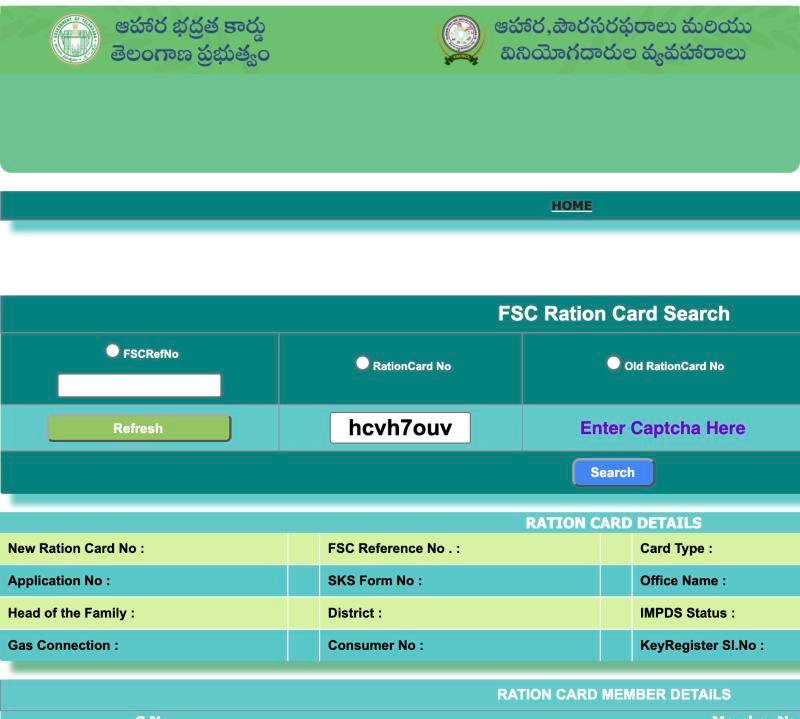 123456
- 1 Choose FSCRefNo and type it
- 2 or RationCard No
- 3 or Old RationCard No
- 4 Type the captcha shown
- 5 Press Search
- 6 Card details appear here
A Cautious Note About the Page Script on the FSC Search Forms
The page's own script contains a handler for a UID radio option. That option is not displayed on screen. We mention it only so you are not surprised if you see tech-savvy comments online. A hidden code path is not a service. If an Aadhaar option ever appears on the live form, use the live form, not this page.
What the FSC Application Form Looks Like Without an Aadhaar Box
The application form, titled MeeSeva Application Search, has a district dropdown, two radio choices and a text box. The note under the image shows where Aadhaar does appear: as a result column only.
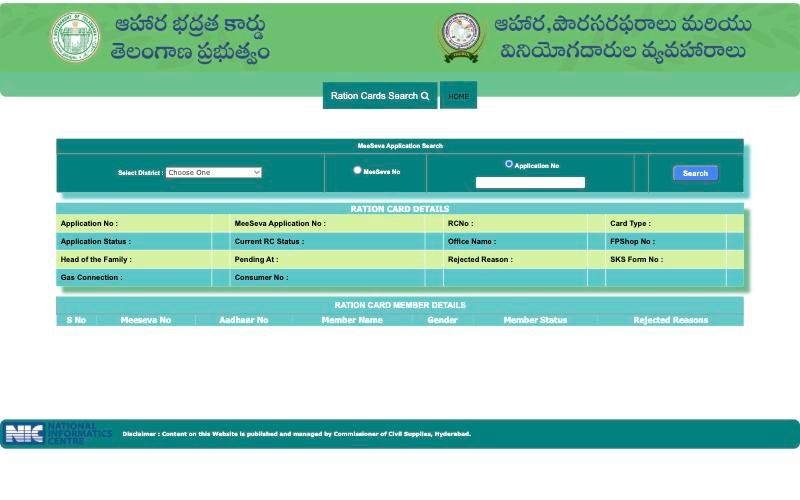 123
123- 1 The only inputs are District...
- 2 ...and MeeSeva No or Application No
- 3 Aadhaar No shows only as a result column, not as a search box
For the full steps, read tracking an application by MeeSeva number.
How to Find Your Ration Card Number Instead of Using Aadhaar
If Aadhaar is all you remember, work through this list. Stop as soon as you find one number.
- Look at the physical card. The card number is printed on it. An older card may carry a number that fits the Old RationCard No option.
- Search phone photos and chats. Many people photograph the MeeSeva receipt.
- Check old papers from the day you applied. The acknowledgement or slip may show an application number.
- Ask the fair price shop dealer. The dealer may be able to see the card number linked to the shop. Ask politely and do not hand over your Aadhaar card.
- Ask the MeeSeva centre or the Civil Supplies office. Carry identity papers and say which district you applied in.
Once you find a number, write it in two safe places. Then use the matching form.
Worked Example: Checking Parents' Application Without Aadhaar Search
A son wants to check his parents' application. He knows only their Aadhaar numbers, so he cannot type anything useful into the portal. He goes to the MeeSeva centre that filed the request and asks them to read out the receipt number. He notes the district, selects it on the form, ticks MeeSeva No and searches. The result lists his parents as rows in the member table.
| Sample member row (illustration) | What he checks |
|---|---|
| S No 1, Aadhaar No (shown by portal), name of the mother, Gender, Member Status | Spelling matches her identity card |
| S No 2, name of the father | Row exists once, with no Rejected Reasons |
He then closes the page and does not save a screenshot of the Aadhaar column.
Myths and Facts About FSC Search With Aadhaar Number
| Myth | Fact |
|---|---|
| You can type Aadhaar into the official FSC form. | The forms we checked have no Aadhaar box. |
| No record means your card is cancelled. | It only means no match was found for what you typed. |
| An agent can search faster if you give an OTP. | The public searches ask for no OTP. Never share one. |
| Paying money guarantees approval. | No one can promise approval. |
| A site with "FSC" in its name is official. | Check the web address, not the page text. |
| The dealer cannot see anything about your card. | A dealer may be able to see the card number linked to the shop. |
Where Aadhaar Does Show Up on the Ration Card Portal
It helps to separate the places where Aadhaar appears from the places where it can be used as a key.
| Place | Can you type Aadhaar there? | What it does |
|---|---|---|
| FSC Ration Card Search | No box displayed | Takes a card number instead |
| FSC Application Search form | No | Takes a district plus a receipt number |
| Application Search result, member table | No, it is output | Shows an Aadhaar No column for each member |
| Rejected card search result | No | Member table lists S No, Member Name and Rejected Reasons |
| Shop machine | Not a portal search | The fingerprint check is a separate step at the shop |
For members of a card with no open application, the card lookup shows a member table too. We have not verified whether it carries an Aadhaar column, so do not count on it.
Which Number to Hunt For: Ration Card Number or MeeSeva Number?
Different situations call for different numbers. Pick the row that matches yours and look for that number first.
| Your situation | Number to find | Likely place to find it |
|---|---|---|
| You have a card at home | Ration Card No | Printed on the card |
| You have an old card from an earlier system | Old Ration Card No | Printed on the old card |
| You applied recently | MeeSeva No or Application No | Receipt, slip or message |
| You think a request was refused | Ration Card No | Old paperwork, the card or the office |
| Nothing is left | Any of the above | MeeSeva centre or Civil Supplies office |
A card number and an FSC Ref No are different things, so check which label your paper uses before you pick an option.
What to Say at the MeeSeva Centre When You Only Have Aadhaar
If you must ask staff, a few clear lines save time.
- "I do not have my ration card number or receipt. I have my identity papers."
- "I applied in this district, around this month."
- "Can you tell me the number I should use to track it?"
- "Can you write it down for me?"
Do not ask staff to type your Aadhaar into a random website, and do not leave your Aadhaar card or phone with anyone.
Why Aadhaar Feels Like the Natural Key for FSC Search
An Aadhaar number is easy to remember, and names can be spelt many ways. So it is natural to expect a ration card page to accept it. The honest position is simpler. On the forms we checked, the portal's keys are numbers tied to the card or the application. That is a limit of the portal, not a mistake on your side.
Several sites describe an Aadhaar search with steps and pictures. We could not find that box on the live forms, so we do not repeat their claims. A page that asks you to type your Aadhaar into its own box to find your ration card deserves suspicion.
What Aadhaar Details You Can Safely Share, and With Whom
| Item | Share with | Do not share with |
|---|---|---|
| Ration card number | MeeSeva staff, Civil Supplies office | Callers, social media |
| Receipt number | The centre where you applied | Chat groups, strangers |
| Aadhaar number | Only where an official process needs it | Any search website, any agent |
| OTP | Nobody | Anyone, for any reason |
| Result screenshot | A trusted family member | Public posts |
Common Aadhaar Scam Patterns Around FSC Search
Ration card scams usually arrive as calls, messages or look-alike pages. A line such as "your card will be cancelled unless you share a code" is the classic opening. Another is "pay a small fee for instant status". The real searches ask for no payment and no code. If someone pressures you, hang up and check with the office yourself.
Once You Have a Ration Card Number: The Short FSC Search Route
Here is the route for each number, so you do not wander through the menu.
- Card number in hand. Open FSC Search, choose FSC Ration Card Search, tick the radio that matches your number, pick the district, type the captcha and press Search.
- Receipt number in hand. Open FSC Search, hover over Ration Cards Search, choose FSC Application Search, pick the district and the matching option.
- Refused card. Choose Status of Rejected Ration Card Search and type the card number in RationCard No.
The official address is epds.telangana.gov.in/FoodSecurityAct. For a tour of the portal itself, see the EPDS Telangana portal guide.
Second Example: Several Family Members and One Lost MeeSeva Slip
A family of five applied together. The slip is gone, and the head of the family can only recall that everyone's Aadhaar was needed at the counter. Searching by Aadhaar is not possible, so they do not waste time on lookalike sites. The head visits the centre with identity papers and asks for the application number. The staff member writes it on a fresh slip. At home they photograph it twice.
| Step | Who | What changed |
|---|---|---|
| Ask the centre for the number | Head of the family | A written number in hand |
| Search with district and Application No | Eldest daughter | Result with five member rows |
| Compare each row with identity cards | Whole family | One spelling looks different |
| Note the difference, ask the office | Head of the family | Next step is a correction request |
The point of the case is the order: number first, search second, questions third.
FSC Search for Children and Elderly Members Without Aadhaar
Children without an Aadhaar number and elderly members whose records were entered long ago are the people most often left out of these discussions. The search itself does not depend on a member's Aadhaar, because it is keyed by a card or receipt number. What may differ is how a member row looks in the result. If a row looks incomplete, note it and ask the office what is needed. Do not guess a cause and do not hurry to a paid agent.
Quick Decision Table: Aadhaar Number, Card Number or MeeSeva Number
| Situation | Next step |
|---|---|
| You found a card number | Use the card lookup on the home guide |
| You found a receipt number | Use the application status guide |
| You found nothing | Visit MeeSeva or the Civil Supplies office with identity papers |
| You found a number but get no record | Recheck district, option and digits, then ask the centre |
If FSC Search With Aadhaar Shows Nothing: What to Check
No record does not necessarily mean rejection. Recheck the district, the option and each digit, then read the guide to application number problems. If an older card seems absent, see what to do when a card is missing.
If a Ration Card Member Shows No Aadhaar Link
A person may be on a card without a linked Aadhaar. That is a separate topic from searching. It can matter at the shop machine. The article on linking Aadhaar to a ration card explains it.
Other Ration Card Details You Might Want to Check
- For a missing member, use the member addition guide.
- For a wrong spelling, use the correction guide.
- For a refused card, use the rejected card guide.
Safety: Never Publish Your Aadhaar Number Online
- Use only the official portal and double-check the web address.
- Never post an Aadhaar number on social media, comments or chat groups.
- Never share an OTP with anyone.
- Be wary of any page that says "enter Aadhaar to find your ration card". It is asking you for data the official forms do not need.
- Do not send result screenshots to strangers.
- Do not pay anyone who promises a quick card.
Frequently Asked Questions
Can I search my ration card by Aadhaar number in Telangana?
Not on the official forms we checked on 25 October 2026. They take a card number, or a district with a MeeSeva or application number. Aadhaar appears only in a result column. Find one of the accepted numbers first, with help from MeeSeva or the Civil Supplies office if needed.
Why do some websites show an Aadhaar search for FSC?
Some sites describe steps that do not match the official forms we checked. The live forms have no Aadhaar box. Trust the official page, and avoid any site that asks you to type your Aadhaar into its own form or share an OTP.
How do I find my ration card number without the card?
Look for a phone photo of the receipt, old papers, or a relative holding the card. Otherwise ask the MeeSeva centre where you applied or the Civil Supplies office to check, with identity papers. Write the number in two safe places once found.
What does the Aadhaar column in the member table mean?
It is a column that appears in the member table after an application search. It is output, not a search box. Use it to check your own details and never post a screenshot of it online.
Can I search by name instead?
None of the three official forms has a name box. Names show up only after a number-based search. If you only know names, ask MeeSeva or the Civil Supplies office, who may be able to look the record up in other ways.
Will the portal ask me for an OTP?
The public search forms we checked had no OTP step. If a page asks for one, confirm the address is the official portal. Never give an OTP to a caller, an agent, a chat account or an unofficial website.