
You filed a request at a MeeSeva centre, they gave you a slip, and now you want to know where the file stands. The official FSC Application Search page is built for that. This guide shows the exact screens, explains each field of the result, and gives one worked example so you know what a real answer looks like.
| In brief |
|---|
| Open the official portal, click FSC Search, hover over Ration Cards Search and choose FSC Application Search. Pick the district where you applied. Choose MeeSeva No or Application No, type the number and press Search. Check your receipt or message to see which number it shows. The form has no Aadhaar or mobile number box. Portal screens and field names were checked against the official portal on 25 Oct 2026. Process advice is general; confirm with MeeSeva or the Civil Supplies office. |
- What Is FSC Application Search Used For?
- How to Do FSC Application Search: Steps With Screenshots
- MeeSeva No or Application No in FSC Application Search?
- Field-by-Field Guide to the Application Search Result Panel
- Worked Example: Checking a New Ration Card Application by MeeSeva Number
- Reading Application Status and Current RC Status Together
- What If FSC Application Search Shows No Record? A Second Case
- What to Say at the MeeSeva Centre About Your Application Status
- A Simple Log for Tracking Application Status and Pending At
- Using FSC Application Search on a Phone
- Can You Do FSC Application Search With Aadhaar?
- Processing Time: What the Application Search Does Not Show
- What to Do If the Application Search Result Looks Wrong
- After the Application Search Result: What to Do Next
- MeeSeva Number or Application No: Which Form Takes Which?
- Common Entry Mistakes in FSC Application Search
- What to Keep Ready Before You Check Application Status
- Safety Tips for FSC Application Search and MeeSeva Numbers
This site is an independent guide. It does not run the search and never asks for an Aadhaar number or OTP. For a tour of the whole portal, see the EPDS Telangana portal guide.
What Is FSC Application Search Used For?
FSC means Food Security Card, the ration card. When you apply for a new card, a change or a member, the request gets its own number. The Application Search page lets you look at that request from a phone or computer.
It is not the page for an existing card. If you already hold a card number, use the card lookup explained on our FSC Search home page. The table below shows how the three official forms differ.
| Form | Inputs | Use it when |
|---|---|---|
| FSC Ration Card Search | FSCRefNo, RationCard No or Old RationCard No, district, captcha | You hold a card number |
| FSC Application Search | District, then MeeSeva No or Application No | You filed a request and have a receipt |
| Status of Rejected Ration Card Search | RationCard No | A card was refused and you know its number |
How to Do FSC Application Search: Steps With Screenshots
Step 1: Open Ration Cards Search on the Official Portal
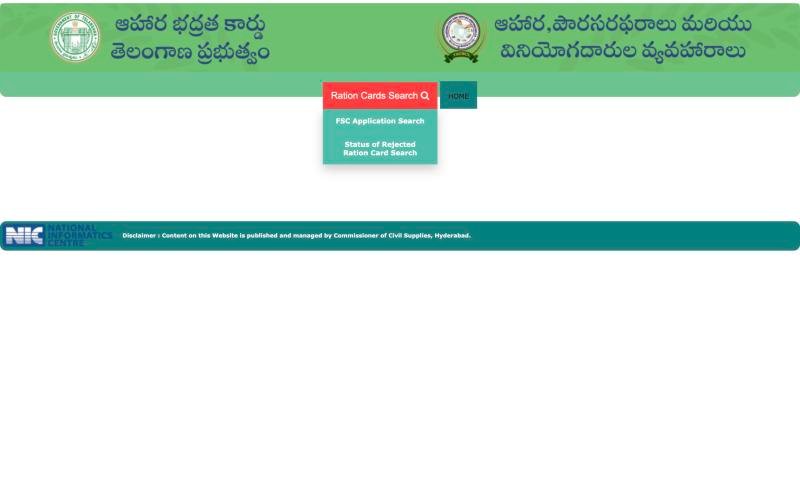
On the official portal, click FSC Search in the left menu. The next page has a Ration Cards Search button. Hover over it. Two options appear: FSC Application Search and Status of Rejected Ration Card Search. Click the first one.
 12
12- 1 Hover Ration Cards Search
- 2 Choose FSC Application Search or Rejected search
Step 2: Fill the FSC Application Search Form
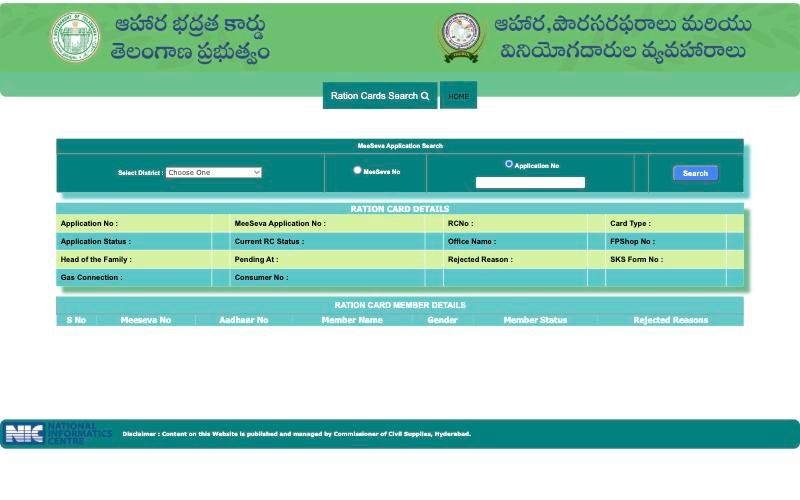
The page is titled MeeSeva Application Search. Open Select District, which starts at "Choose One", and pick the district where you applied. Choose the radio option that matches your number. Type it in the box and press Search.
 1234
1234- 1 1 Choose the district where you applied
- 2 2 Choose MeeSeva No from your receipt
- 3 3 Type the receipt number
- 4 4 Read Application Status, Current RC Status and Pending At
Step 3: Read the Application Status Result
A panel called Ration Card Details appears, with a member table under it. Note the exact words you see, with the date. The next sections explain them.
MeeSeva No or Application No in FSC Application Search?
Check your receipt or message to see which number it shows. A MeeSeva centre receipt usually carries a number you can try under MeeSeva No. A message or slip may show an application number for Application No. If one option shows nothing, you can try the other once.
- Take a phone photo of the slip the day you get it.
- Type slowly. A space at the start or end can break a match.
- Watch for the letter O against zero on a small screen.
- If the slip is lost, ask the same centre to read the number from their records.
Try the district where you applied. If no record appears, ask the office.
Field-by-Field Guide to the Application Search Result Panel
The portal does not explain its own labels. The right-hand column is our general reading of each label. We have not verified the values the portal can show, so note your exact wording and ask the office if it is unclear.
| Field | General reading | What to do with it |
|---|---|---|
| Application No | Number of your request in the system | Match it to your slip |
| MeeSeva Application No | Number issued through the MeeSeva centre | Match it to your receipt |
| RC No | Ration card number linked to the request | If blank, no number is shown yet; save it once it appears |
| Card Type | Category of the card | Ask the office if the category is unclear |
| Application Status | Where the request stands | Copy the exact word and the date |
| Current RC Status | State of the card record | Read it together with Application Status |
| Office Name | Office linked to the record | Useful when you visit |
| FP Shop No | Fair price shop linked to the card | Check it is your shop |
| Head of the Family | Named head of the household | Spelling should match identity papers |
| Pending At | Shows where the application is waiting | We have not verified the possible values; note the exact wording and ask the office to explain it |
| Rejected Reason | Remark given if something was not accepted | Copy it exactly |
| SKS Form No | A form number on the record | We do not expand this label; keep it with your papers |
| Gas Connection and Consumer No | Gas link details on the record | Compare with your gas book |
An empty field does not by itself mean a fault.
The Member Table in the Application Search Result
Below the panel, each row is one person. The columns are S No, MeeSeva No, Aadhaar No, Member Name, Gender, Member Status and Rejected Reasons. Count the rows and compare every name with identity papers. A member can be refused while others are accepted, so read each row. Keep the Aadhaar column private; never post a screenshot of it.
Worked Example: Checking a New Ration Card Application by MeeSeva Number
Suppose Lakshmi filed a request for a new card at a MeeSeva centre. Her receipt shows one number, so she selects her district, ticks MeeSeva No, types the number and presses Search. Imagine a result like this. It is an illustration of the layout, not real data.
| Field | Sample value |
|---|---|
| Application Status | (a status word, for example one the office can explain) |
| Pending At | (an office name) |
| Rejected Reason | (blank) |
| Member row 2 | S No 2, name spelt differently from the identity card |
Lakshmi does three things. She writes down the status words and today's date. She notices the spelling difference in row 2 and plans a name correction request. She re-checks later instead of searching ten times in a day. At her next visit she asks the MeeSeva centre what the Pending At entry means for her request type.
Reading Application Status and Current RC Status Together
The two status fields answer different questions. Application Status is about your request. Current RC Status is about the card record. We have not verified the values the portal can show, so do not rely on any list you find elsewhere. Use this small grid to decide what to write down and ask.
| What you see | What to note | What to ask the office |
|---|---|---|
| Both fields filled | Both exact words and the date | Whether the two wordings agree for your request type |
| Only one field filled | Which one, and which is blank | Whether a blank is normal at this stage |
| Rejected Reason filled | The reason word for word | What paper or detail would change the outcome |
| Pending At names an office | The office name | What that office checks before the next step |
| Member rows differ in status | Which row, which name | Why one person differs from the rest |
What If FSC Application Search Shows No Record? A Second Case
Ravi filed an application and searched the same evening. The page said no record was found. He did not panic. He ran through the usual checks in order and then asked the centre. The sample entries below are an illustration, not real data.
| Check | Sample finding | Result |
|---|---|---|
| District selected | He had left "Choose One" | Fixed, searched again |
| Radio option | MeeSeva No ticked but the slip showed an application number | Switched to Application No |
| Digits | Letter O typed in place of zero | Retyped from the photo of the slip |
| Still nothing | Slip is only hours old | Asked the centre to confirm the file was submitted |
Most of the time the cause is on the entry side, but not always. If every check passes, the centre can tell you whether the request reached the system.
What to Say at the MeeSeva Centre About Your Application Status
Staff can help faster when you arrive prepared. Read this script, or show it on your phone.
- "I applied on this date. This is my receipt."
- "I searched in this district with this number and option."
- "The page shows these exact words under Application Status and Pending At."
- "Can you check that the file reached the system?"
- "How long does this request type normally take, and what number should I track it with?"
Write the reply with the date and the name of the person who gave it. Ask for a written acknowledgement if you hand over extra papers.
A Simple Log for Tracking Application Status and Pending At
A short log removes arguments later. A notebook page is enough.
| Date | Number and option used | Application Status | Pending At | Anything new |
|---|---|---|---|---|
| Day of filing | Number from the receipt | (write what you see) | (write what you see) | Photo of the slip saved |
| Next check | Same number, same option | (write what you see) | (write what you see) | Note any change |
| After a visit | Reply from the staff member | (write what you see) | (write what you see) | Name and date of the person |
Check again later rather than every hour. A slow page is not a changed file.
Using FSC Application Search on a Phone
A phone works for this form, but small screens cause small errors. Turn the phone sideways and zoom in before you type. Read the number back against the slip photo before you press Search. If a hover menu will not open, tap the button once and wait, or use the desktop-site option. If you help an elderly parent, sit with them, and delete the screenshots when you are done.
Can You Do FSC Application Search With Aadhaar?
People often ask for an application search by Aadhaar number. The form has no such box. An Aadhaar column appears only inside the result table. Our Aadhaar explainer covers what to do if that is the only number you remember.
Processing Time: What the Application Search Does Not Show
The portal does not show a processing time. Ask the MeeSeva centre or office how long your request type normally takes. Then keep a simple note of each check: date, status word, and the office named under Pending At.
What to Do If the Application Search Result Looks Wrong
Three situations come up again and again. Each has its own guide, so we only point to them.
- Pending for a long time. Note the Pending At wording and take your slip to the centre. The pending application guide explains what to ask.
- Rejected Reason is filled. Copy the reason and compare it with your papers. The rejected card guide shows how to respond.
- No record found. That is not the same as a rejection. Recheck the district, option and digits, then read the application number problems guide.
After the Application Search Result: What to Do Next
| If the result shows | Then |
|---|---|
| An office under Pending At | Log it, check again later, and ask the centre what that office does |
| A Rejected Reason | Copy it, compare it with your papers, then read the rejected card guide |
| A wrong name or detail | Read the correction guide |
| A missing member | Read the member addition guide |
| A card number and the shop still refuses grain | Read the shop refusal guide |
| No record | Recheck inputs, then ask the centre |
MeeSeva Number or Application No: Which Form Takes Which?
| You have | Use | Enter |
|---|---|---|
| Receipt from a MeeSeva centre | FSC Application Search | District, then MeeSeva No |
| Slip or message with an application number | FSC Application Search | District, then Application No |
| A card number and a suspected refusal | Status of Rejected Ration Card Search | RationCard No |
| Only an Aadhaar number | None of the forms | Find the receipt number first |
| No paper at all | None yet | Ask the centre where you applied |
Common Entry Mistakes in FSC Application Search
- Radio and number mismatch. The option you tick must match the number you type.
- District left at "Choose One". Pick the district first.
- Pasted spaces. Retype the number if a pasted one fails.
- Letter O for zero. Zoom in before typing.
- Searching minutes after applying. Check again later.
What to Keep Ready Before You Check Application Status
- The MeeSeva receipt or slip, plus a phone photo of it.
- The district of application.
- A notebook or notes app for dates and status words.
- Identity papers of the head of the family, in case you visit an office.
Safety Tips for FSC Application Search and MeeSeva Numbers
- Open only the official portal and avoid forwarded links.
- Never share an OTP over the phone.
- Do not pay for fast approval; confirm any fee at MeeSeva.
- Do not post your slip or screenshots on social media.
With the slip and district in hand, the whole search takes about a minute. If a member is missing from the table, see adding a member.
Frequently Asked Questions
How do I check ration card application status in Telangana?
Use FSC Application Search on the official portal. Click FSC Search, hover over Ration Cards Search, select your district, choose MeeSeva No or Application No, type the number and press Search. Then read Application Status, Pending At and Rejected Reason in the result.
What does Pending At mean in the result?
It shows where the application is waiting. We have not verified the possible values, so note the exact wording with the date and ask the MeeSeva centre or Civil Supplies office to explain what it means for your request type.
Which should I choose, MeeSeva No or Application No?
Look at your receipt or message. Use MeeSeva No for the number printed by the centre, and Application No for the number given as an application number. If one option shows nothing, try the other once before assuming a problem.
Why does the form ask for a district first?
The district narrows the lookup. Try the district where you applied, which may differ from where you live now. If no record appears, ask the office to confirm where the file was registered.
Is there a processing time I can check?
The portal does not show one. Ask the MeeSeva centre or office how long your request type normally takes, and keep a dated note of every status word you see.
What if the RC No field is blank?
It may simply mean no card number is shown for that request yet. Save the result details, check again later, and ask the office if the blank remains while the status has changed.
Does the application search show every family member?
The result has a member table with one row per person. Count the rows and compare spellings with identity papers. If someone is missing, a member addition request may be needed; ask the office how to file it.
Can I use this form for an old ration card number?
No. The application form takes a district plus a MeeSeva or application number. A card number belongs in the FSC Ration Card Search, which has its own radio options for card numbers.