The quick version: To add a member to a ration card in Telangana, the person must belong to your household and must not already be on another card. Apply once, keep the receipt, and track it with that number.
- Check your card's member list and confirm the person is missing.
- Ask whether the person is on any other card, such as a parents' card.
- Apply through the right service, keep the receipt, and track it.
- Add Member to Ration Card Telangana: Which Case Applies to You?
- Member Addition Walkthrough: Newborn, Spouse or Relative
- Documents Checklist to Add a Member to a Ration Card
- How to Track a Ration Card Member Addition Request
- What to Do If a Member Addition Request Is Slow or Rejected
- Member Approved but Not Yet Showing on the Ration Card
- Member Addition Example: Two Telangana Cases Compared
- What to Say at the MeeSeva Centre When Adding a Member
- Mistakes to Avoid When Adding a Member to a Ration Card
- Records to Keep After a Ration Card Member Addition
This guide is for families with a newborn, a new spouse or a relative left off the card. This site is independent and not a government website.
Add Member to Ration Card Telangana: Which Case Applies to You?
The first question decides everything: is the person already on some card? A person on two cards at once may cause a conflict. Use this table to pick the route.
| Person's situation | Likely route | Next step |
|---|---|---|
| Newborn, never on any card | Member addition | Birth proof ready, apply once |
| Spouse, never on any card | Member addition | Marriage proof ready, apply once |
| Spouse still on parents' card | Migration or removal first | Read the transfer and migration guide |
| Relative left out of the card | Member addition | Ask the office what proof they need |
| Name is on the card but misspelt | Correction, not addition | See name and address correction |
Service names can differ on the official side. Check with MeeSeva before you apply.
Member Addition Walkthrough: Newborn, Spouse or Relative
All three cases start the same way. Search your card on ePDS Telangana and read the member list. If the person is already there, you do not need addition at all.
Adding a Newborn to a Ration Card
The baby is usually not on any card, so addition is the natural route. Get the birth proof first. Ask the dealer or the office how a very young child is handled at the shop. Do not assume the rules for adults apply.
Decide the baby's name before you apply. A wrong name later needs a separate correction.
Adding a Spouse to a Ration Card
Ask first whether the spouse is still on the parents' card. If yes, that entry needs attention before the spouse can join your card. The parents may need to take part in that step, so speak to them early.
Adding a Left-Out Relative to a Ration Card
This is the case where the person has lived with you but never made it onto the card. Be ready to explain why. Ask the office what shows the person belongs to your household.
Documents Checklist to Add a Member to a Ration Card
We have not verified an official document list. Treat this as a starting checklist and confirm locally with MeeSeva or Civil Supplies.
| Paper | For whom |
|---|---|
| Your ration card, or the card number | Everyone |
| Aadhaar of the person, where they have one | Spouse, relative, sometimes newborn |
| Birth certificate or similar proof | Newborn |
| Marriage certificate or similar proof | Spouse |
| Proof of the earlier card or its removal | Anyone who was on another card |
Show Aadhaar only at the official counter. Never read out an OTP over the phone.
How to Track a Ration Card Member Addition Request
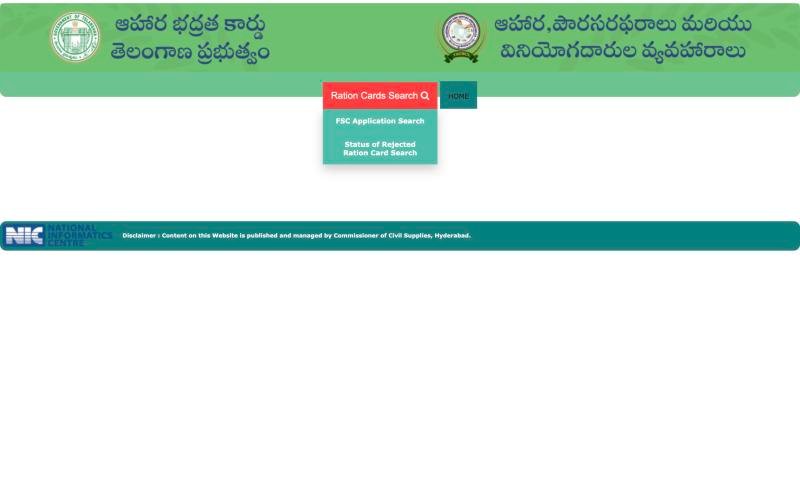
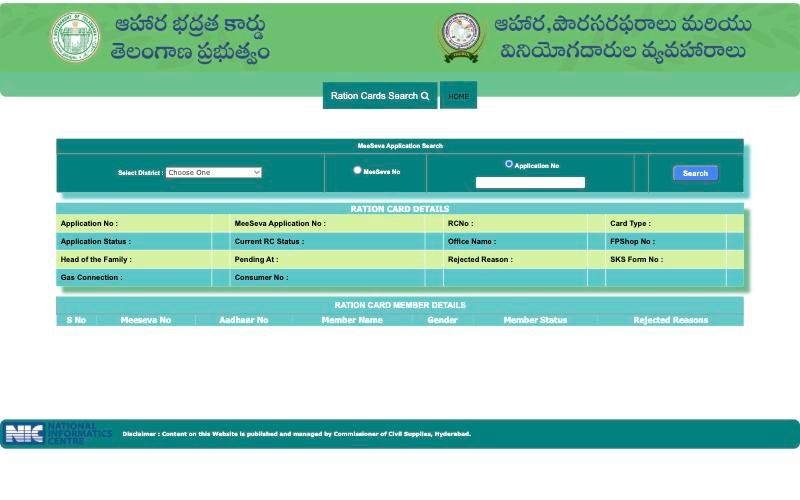
After you apply, keep the receipt safe. On the official portal, open FSC Search, then Ration Cards Search, then FSC Application Search. Choose your district, pick MeeSeva No or Application No, and type the number from your receipt. Check your receipt or message to see which number it shows.
 12
12- 1 Hover Ration Cards Search
- 2 Choose FSC Application Search or Rejected search
 12345
12345- 1 Select your district
- 2 Pick MeeSeva No or Application No
- 3 Type the number
- 4 Press Search
- 5 Result fields appear here
The result shows Application Status and Pending At, and a MEMBER DETAILS table with a Member Status and Rejected Reasons column. We have not verified every value those fields can show. Note the exact wording and ask the office if a word is unclear. The FSC Application Search guide covers the form in detail.
What to Do If a Member Addition Request Is Slow or Rejected
The portal does not show a processing time. Ask the MeeSeva centre or the office how long your request type normally takes, and check again later. Do not file a second application meanwhile, because a duplicate may confuse the first. For a request that seems stuck, read what to do when an application is pending.
If a member is rejected, read the reason shown against that member. Common reasons can include a name or Aadhaar mismatch, a person on another card, or a missing paper. Our rejected reasons guide shows how to read it. If the Aadhaar link is the issue, see Aadhaar not linked to a ration card.
Do not pay brokers who promise approval. No one can guarantee it.
Member Approved but Not Yet Showing on the Ration Card
- Check the receipt and the Application Status again later.
- Search the card in FSC Ration Card Search and read the member list.
- If the person is still missing, call the helpline with the receipt number.
If the whole card cannot be found, see ration card missing in database.
Member Addition Example: Two Telangana Cases Compared
Take two families. The Reddy family has a baby born this year. The baby is on no card, so the family searches the card, sees the member list has four names, and confirms the baby is missing. They plan an addition with the birth proof.
The Naik family has a daughter-in-law who married in. Her name is on her parents' card in another district. The Naik family cannot simply add her. They ask her parents and the office how her old entry is handled, and only then plan the addition. The difference between the two cases is one question: is the person already on a card?
What to Say at the MeeSeva Centre When Adding a Member
A short, clear request saves a second visit. You can say it almost word for word.
- "I want to add a family member to my ration card. My card number is this."
- "The person is a newborn, spouse or relative, and is not on any other card, as far as I know."
- "Which papers do you need, and which number will I get to track the request?"
- "Is there any step that needs the parents' card holder to be present?"
Write down the answers. If the centre tells you a paper that is not in the checklist above, follow the centre. Their instruction for your case counts more than any general list.
Mistakes to Avoid When Adding a Member to a Ration Card
- Using addition when the real problem is a misspelt name.
- Applying while the person is still on another card.
- Typing a name differently from the Aadhaar or the birth proof.
- Losing the receipt, so there is nothing to track with.
- Applying twice because the first feels slow.
Most of these are avoided by one calm check of the card before you apply.
Records to Keep After a Ration Card Member Addition
Keep one folder, on paper or on your phone, for this request. Put in the receipt, a photo of the card, the proof you submitted and any message you received. If you need to contact the office later, you can quote the receipt in seconds.
Frequently Asked Questions
When should I use member addition on a ration card?
Use it when a person who joins your household is not on any card, such as a newborn or a new spouse. Do not use it to fix a misspelt name, which is a correction. Ask MeeSeva for the current service name.
What is the difference between adding a member and migration?
Addition is for a person who is on no card. Migration is for a person who is on another card and is moving to yours. Check the old record first, then ask the office which route applies.
How do I add a newborn baby to the ration card in Telangana?
Keep the birth proof ready, confirm the baby is on no other card, and apply through MeeSeva or the official channel. Decide the baby's name first, and keep the receipt for tracking.
Can I add my wife's name to the ration card?
If she is on no card, addition may work. If she is still on her parents' card, that entry may need removal or migration first. Ask the office for the steps and proofs.
How do I check the status of my member addition request?
Open FSC Application Search on the official portal, select the district, choose MeeSeva No or Application No, and type the receipt number. Then read Application Status, Pending At and the member table.
My member was added but is not showing. What next?
Check the receipt, search the card again later, and compare the member list with your request. If the person is still missing, call the helpline with the receipt number.
Similar guides
Ration Card Transfer Telangana
Ration card transfer Telangana: work out whether you need a transfer, member migration, addition or correction after marriage or a move, and how to track it.
Ration Card Correction Telangana
Ration card correction in Telangana: fix a wrong name or address with a before and after example, a script for the office and how to check the result.
Ration Card Rejected Telangana
Ration card rejected in Telangana? Read the Rejected Ration Card Search result, match each member's reason to an action, and reapply once without brokers.